
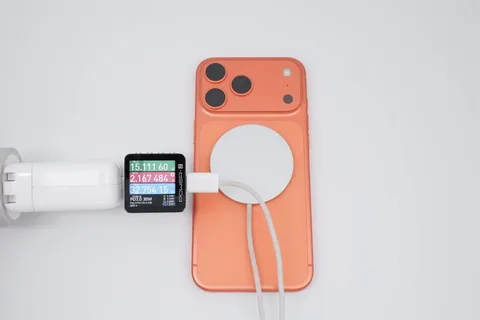
You just got your hands on the new iPhone 17, or you’re about to. Either way, one question pops up fast: what iPhone 17 charger do you actually need?
It sounds like a simple question, but the answer has some nuance to it. Not every USB-C charger unlocks the iPhone 17’s full charging speed. Not every wireless pad performs the same. And if you’re still holding onto a Lightning cable from your old iPhone, it’s time to let it go.
This guide walks you through everything clearly from what charging port the iPhone 17 uses, to which wattage gives you the fastest top up, to how to keep your battery healthy long term. No fluff, no jargon. Just the right information to help you charge smarter in 2026.
Why Your Old Charger Might Not Cut It Anymore
Apple has been on a journey toward a universal charging standard for years, and with the iPhone 17, that shift is fully complete. If your charging drawer is full of Lightning accessories, those are now officially retired for iPhone use.
But it goes further than just the connector type. Even some USB-C chargers the kind that technically fit won’t give you the speed you’re paying for with an iPhone 17 charger. The technology behind fast charging involves specific power delivery protocols, and not all chargers speak the same language.
Think of it like this: a garden hose can fill a bucket, but a fire hose does it in a fraction of the time. Your iPhone 17 is built for the fire hose. You just need the right one.
What Port Does the iPhone 17 Use?
The iPhone 17 uses a USB-C port the same connector found on modern MacBooks, iPads, Android phones, and most laptops. Apple made this switch with the iPhone 15 back in 2023, and the iPhone 17 continues that standard with enhanced performance.
What makes the iPhone 17’s USB-C implementation especially capable is its support for USB Power Delivery (PD) 3.1 the smart charging protocol that lets your phone and charger negotiate the ideal voltage and current in real time. This means faster charging, less heat, and better protection for your battery.
Your existing USB-C cable and charger from an iPad Pro or MacBook? There’s a good chance it’ll work. But as you’ll see in the next section, getting the full speed out of your iPhone 17 charger requires matching the right wattage.
Does the iPhone 17 Come With a Charger?
No and this shouldn’t be a surprise at this point. Apple removed the power adapter from the iPhone box starting with the iPhone 12, and every model since has followed that policy.
When you open the iPhone 17 box, you’ll find:
- The iPhone 17 handset
- A USB-C to USB-C cable
- Documentation
That’s it. No wall plug included. Apple frames this as an environmental decision smaller packaging, fewer accessories that go unused. Whether you agree with the reasoning or not, the practical effect is the same: you need to buy an iPhone 17 charger separately if you don’t already have a compatible one.
The good news is that the market for USB-C chargers is enormous, competitive, and full of solid options at every price point. You don’t need to buy Apple’s official adapter unless you want to.
How Fast Can the iPhone 17 Charge?
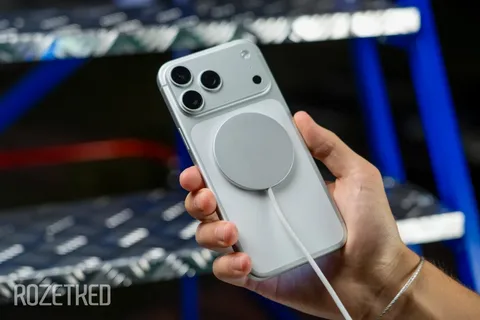
This is where things get genuinely exciting. The iPhone 17, iPhone 17 Pro, and iPhone 17 Pro Max all support up to 40W wired fast charging a significant jump from the 20W ceiling on older models.
With the right USB-C power delivery charger rated at 40W or higher, you can hit roughly 50% battery in about 20 minutes. That’s a meaningful upgrade, especially if you’re always running low before heading out.
Here’s a practical breakdown by charger wattage:
- 5W (old USB-A adapter): Very slow. Avoid for everyday use.
- 20W (previous iPhone standard): Works, but won’t unlock full speed on iPhone 17 / Pro / Pro Max.
- 27W–30W: A solid middle ground fast, but not at peak iPhone 17 capability.
- 40W or higher: This is the sweet spot. Reaches 50% in ~20 minutes, full charge in roughly 75–90 minutes.
- 65W–140W: Completely safe. Your iPhone only draws what it needs the extra wattage powers your laptop simultaneously if you have a multi-port adapter.
One important distinction: the iPhone 17 Air has a different charging profile. It’s capped at 20W wired so a 40W charger won’t make it faster, though it won’t harm it either.
For wireless charging, the iPhone 17 Pro lineup supports Qi2 (also called Qi2.2) at 25W a major improvement over earlier generations. The iPhone Air tops out at 20W wirelessly.
Wired vs. Wireless: Which Is Better for iPhone 17?
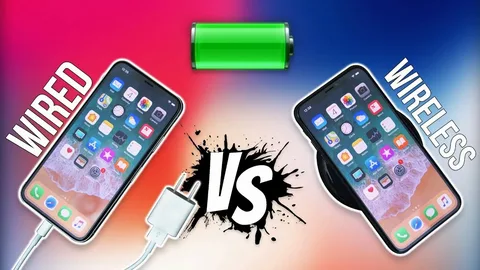
Both options are genuinely good in 2026, and the right choice depends on your lifestyle rather than any hard technical rule.
Wired USB-C Charging
Wired is still faster, period. A 40W USB-C iPhone 17 charger will outpace any wireless pad in a head-to-head race. If you’re in a hurry say, 15 minutes before leaving the house plug in. You’ll get a noticeably bigger battery bump than you would from wireless.
Wired charging is also more energy efficient. Less power is lost in the transfer process compared to wireless induction.
MagSafe and Qi2 Wireless Charging
MagSafe and the Qi2 standard have closed the gap significantly. At 25W on the iPhone 17 Pro models, wireless charging is faster than wired charging was on the iPhone 13. That’s not a small thing.
The magnetic alignment system snaps the charger into exactly the right position every time, preventing the misalignment that used to make older Qi charging unreliable. If you charge overnight on a nightstand stand, or during video calls with your phone propped up, MagSafe and Qi2 pads offer a genuinely elegant experience.
The practical answer for most people: use a wireless pad at home for convenience, and keep a compact wired USB-C charger in your bag for fast top ups on the go.
What to Look for When Buying an iPhone 17 Charger
With so many options out there, it helps to know which specs actually matter and which are marketing noise.
Wattage and Power Delivery Support
For the iPhone 17, 17 Pro, and 17 Pro Max, look for a charger that supports USB Power Delivery at 40W or higher. For the iPhone 17 Air, 20W PD is sufficient for full speed charging.
Avoid chargers that don’t mention Power Delivery at all they may be USB-C in shape but lack the smart protocol that enables fast charging.
GaN Technology
GaN (Gallium Nitride) chargers are smaller, run cooler, and are more energy efficient than traditional silicon based adapters. If you want a compact travel charger that doesn’t sacrifice performance, look for the GaN label. Many reputable brands now offer 45W–65W GaN chargers smaller than a matchbox.
Cable Quality
Your cable matters too. For full 40W charging, your USB-C cable needs to be rated for at least 60W (3A). Most modern USB-C cables meet this standard, but it’s worth checking especially with ultra-cheap cables from unknown brands.
You do not need an expensive 100W “e marked” cable just for iPhone charging. Those are useful if you’re also powering a laptop from the same cable, but they’re not a requirement for your iPhone 17 charger setup.
Safety Certifications
Look for chargers with UL, CE, FCC, or RoHS certification. These indicate that the device has passed independent safety testing for electrical standards, thermal protection, and surge resistance. A certified charger is far less likely to cause overheating, battery damage, or (in extreme cases) electrical hazards.
Avoid uncertified no-name chargers with suspiciously low prices and no safety markings. The money you save on a cheap charger is not worth the risk to a $1,000 phone.
Multi-Device Charging Stations
If you’re in the Apple ecosystem iPhone, Apple Watch, AirPods, MacBook a multi-device charging station is one of the most practical purchases you can make. Many now combine USB-C ports, MagSafe capability, and wireless watch charging in a single compact unit, turning your bedside table into a clean, organized charging hub.
iPhone 17 Charging Tips to Protect Battery Health
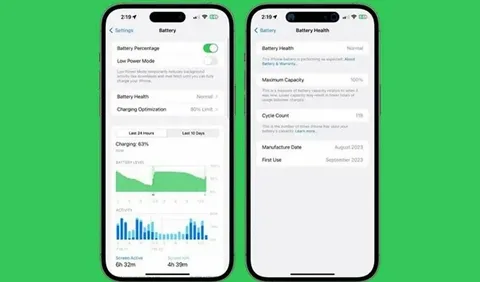
Getting the fastest charge is only half the story. Keeping your battery healthy over time is equally important and the right habits can meaningfully extend how long your battery performs at full capacity.
Avoid extreme heat while charging. Heat is the primary enemy of lithium-ion batteries. Remove thick cases if your phone gets warm during fast charging, and avoid charging in direct sunlight or hot cars.
You don’t need to charge to 100% every time. Lithium ion batteries perform best when kept between 20% and 80%. Apple’s iOS includes an “Optimized Battery Charging” setting that learns your routine and slows the final charge phase to reduce stress on the battery keep this enabled.
Overnight charging is fine with modern iPhones. iOS manages the charging curve intelligently, pausing at 80% and only completing the final 20% just before you typically wake up. You won’t damage your battery by leaving it plugged in overnight.
Don’t use your phone for demanding tasks while fast charging. Gaming or streaming while charging with a high wattage adapter generates more heat from both the processor and the battery simultaneously. If you need to charge fast, set the phone down.
Use your iPhone 17 charger from a reputable brand. Cheap, uncertified chargers can deliver unstable voltage that degrades battery health faster sometimes imperceptibly at first, but meaningfully over months.
Conclusion
The iPhone 17 charger question has a clear answer once you know what to look for. You need USB C that’s non negotiable. For the best experience, pair your iPhone 17 with a 40W or higher USB-C Power Delivery charger, a certified 60W rated cable, and consider adding a MagSafe or Qi2 wireless pad for everyday convenience.
Skip the cheap uncertified adapters. Skip Lightning entirely. And don’t stress about high wattage chargers your iPhone 17 is smart enough to take only what it needs.
Whether you’re a commuter who needs a 20 minute power surge or someone who just wants a clean nightstand setup, the right iPhone 17 charger makes a genuine difference. Now you know exactly what to get.
Frequently Asked Questions
Does the iPhone 17 use a Lightning or USB-C charger?
The iPhone 17 uses USB-C exclusively. Lightning is no longer compatible with any iPhone 17 model. If you’re upgrading from an iPhone 13 or earlier, you’ll need a new cable and adapter.
What wattage charger should I buy for the iPhone 17?
For the iPhone 17, 17 Pro, and 17 Pro Max, a 40W USB-C Power Delivery charger is the sweet spot for maximum speed. For the iPhone 17 Air, 20W is sufficient. Higher wattages (65W, 100W) are safe your iPhone will only draw what it needs.
Can I use my MacBook charger on my iPhone 17?
Yes. Any USB C charger that supports Power Delivery will work safely with your iPhone 17. A 61W or 96W MacBook charger will fast-charge your iPhone without causing any damage the phone self-limits its draw.
Is MagSafe charging as fast as wired on the iPhone 17?
Not quite, but it’s closer than ever. MagSafe and Qi2 deliver up to 25W wirelessly on the iPhone 17 Pro models faster than what wired charging offered on iPhones just two generations ago. Wired at 40W is still faster overall, but the gap is much smaller now.
Will my old USB-A charger work with the iPhone 17?
Technically yes, with a USB-A to USB C cable but it will charge slowly. Most USB A adapters output 5W to 12W and don’t support Power Delivery. You’ll get a charge, but nothing close to the iPhone 17’s fast charging capability. It’s worth upgrading to a proper USB-C PD charger.
